
Mmodemmo School Management System keeps attendance, levies, SBA marks, mock exams, and report cards moving automatically — on one system your school owns completely. No more weekends spent compiling report cards by hand.
Three steps, then it runs itself.
Install Mmodemmo School Management System App on one school computer, customize your academic calendar and school profile info, then add your students, teacher records, subjects, grading scale, and school levies.
On the Desktop + Online Portal tier, give each teacher a PIN and link to the portal. On Desktop Only, hand out an Excel template instead — either way the data flows into the system.
Report cards, BECE analysis, SMS results to parents, and backups all happen without you touching a spreadsheet.
What's included depends on which tier you choose — see Pricing below.
Two ways to buy, depending on what your school needs.
Attendance, levies, SBA marks, and instant report cards — plus custom subjects & grading scales, teacher records, SMS results to parents, exports to PDF/Excel, and automatic Google Drive backup. Mock exams and BECE analysis are not applicable at primary level, so they're excluded from this price.
Attendance, levies, SBA & mock exam marks, and instant report cards — plus custom subjects & grading scales, teacher records, SMS results to parents, BECE Results Analysis, exports to PDF/Excel, and automatic Google Drive backup. The full feature set for junior high.
For schools running both levels under one roof — everything in Primary and JHS combined, including SBA & mock exam marks, BECE Results Analysis, custom subjects & grading scales, teacher records, SMS results to parents, exports to PDF/Excel, and automatic Google Drive backup, all on one bundled desktop price.
The Online Portal add-on is the same price across all tiers. Prices shown are per school, one-time purchase.
Pay once and own it — no recurring fees, no yearly renewal, no feature paywall, for either tier.
Questions schools ask before buying.
Tiers
Desktop Only gives you the full desktop application — attendance, levies, SBA & mock exam marks, report cards, and BECE analysis, with automatic Google Drive backup. Desktop + Online Portal adds the online admin/teacher portal on top, so teachers can record attendance, levies, and marks from their own phone or computer using an admin-issued PIN.
Yes — you can upgrade from Desktop Only to Desktop + Online Portal at any time. Your existing records carry over; nothing needs to be re-entered.
Setup & Access
The desktop app works fully offline. Only the online portal (for admin & teacher access), SMS sending, and backup sync need an internet connection.
No — on the Desktop + Online Portal tier, teachers use the online portal from any phone or computer browser with the PIN and link you give them; no software install required. On Desktop Only, there's no portal — teachers record on an Excel template or manually type records instead.
On the Desktop + Online Portal tier, yes — you can hand out an Excel template instead, and they fill in marks manually for you to import. On Desktop Only, Excel is how all teachers record data, since there's no portal on that tier.
No limit — add as many teachers and students as your school needs.
Cost
No. It's a one-time purchase with no recurring fees and no expiry date.
Yes — SMS results and notices are sent through a third-party SMS gateway (Arkesel), which bills separately at a low per-message rate. In practice this typically works out to around GH₵20–30 per term for a school, depending on how many messages are sent.
Regular bug-fix updates are free. Major version upgrades — ones that add significant new functionality — may carry a separate upgrade fee.
The app checks automatically each time it opens and shows a small in-app notice if a newer version exists — just click through to download it and run the new installer over the old one. No uninstalling, and your school data is untouched either way.
Data Safety
Your data is backed up automatically to the school's own Google account. Reinstall the app on any new machine and restore everything from that backup.
No. All data stays inside your school's own Google account at all times — it is never shared with or visible to any other school or third party.
Only staff the admin adds and grants access to. The admin controls every permission and can revoke access at any time.
Day-to-Day Use
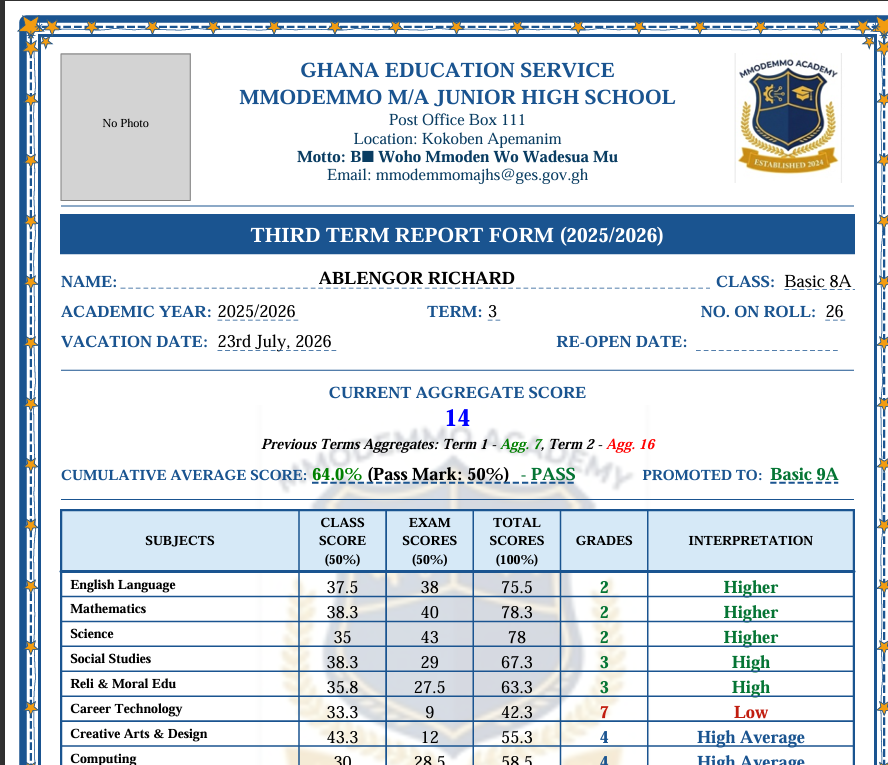
Automatically, as soon as marks are entered — both terminal and mock exam report cards, with no manual compilation.
Yes — admins can rename or add subjects and adjust grading scales to match their school's own standard.
Yes, by SMS — performance and mock exam results can be sent straight to parents, along with custom meeting or notice messages.
Yes — every record, including attendance, levies, and marks, can be exported to PDF or Excel at any time.
Support
First, check the video tutorials on YouTube — most questions are answered there. You can also ask in our Telegram group, where common questions get answered for everyone. If you're still stuck or something's actually broken, contact the developer directly on WhatsApp or Telegram.
You get access to step-by-step video tutorials on YouTube covering setup and every core feature. You'll also be added to our Telegram group, where you can ask questions and see answers to things other schools have run into. Still stuck? Reach out to the developer directly on WhatsApp or Telegram.
Watch a short walkthrough, or message on WhatsApp to see the system on your own school's data.